
Cognilium AI · Paralegent AI
I led the AI that reviews contracts inside Microsoft Word.
As AI Solutions Engineer at Cognilium AI, I led Paralegent AI as its product manager, from idea to production. A legal team uploads its own playbook once; 18+ specialist AI agents then review every contract against it and return GREEN, ORANGE or RED findings — with replacement language — right in the Word document.

AI Solutions Engineer · Cognilium AI · product manager for Paralegent AI
January 2026 – present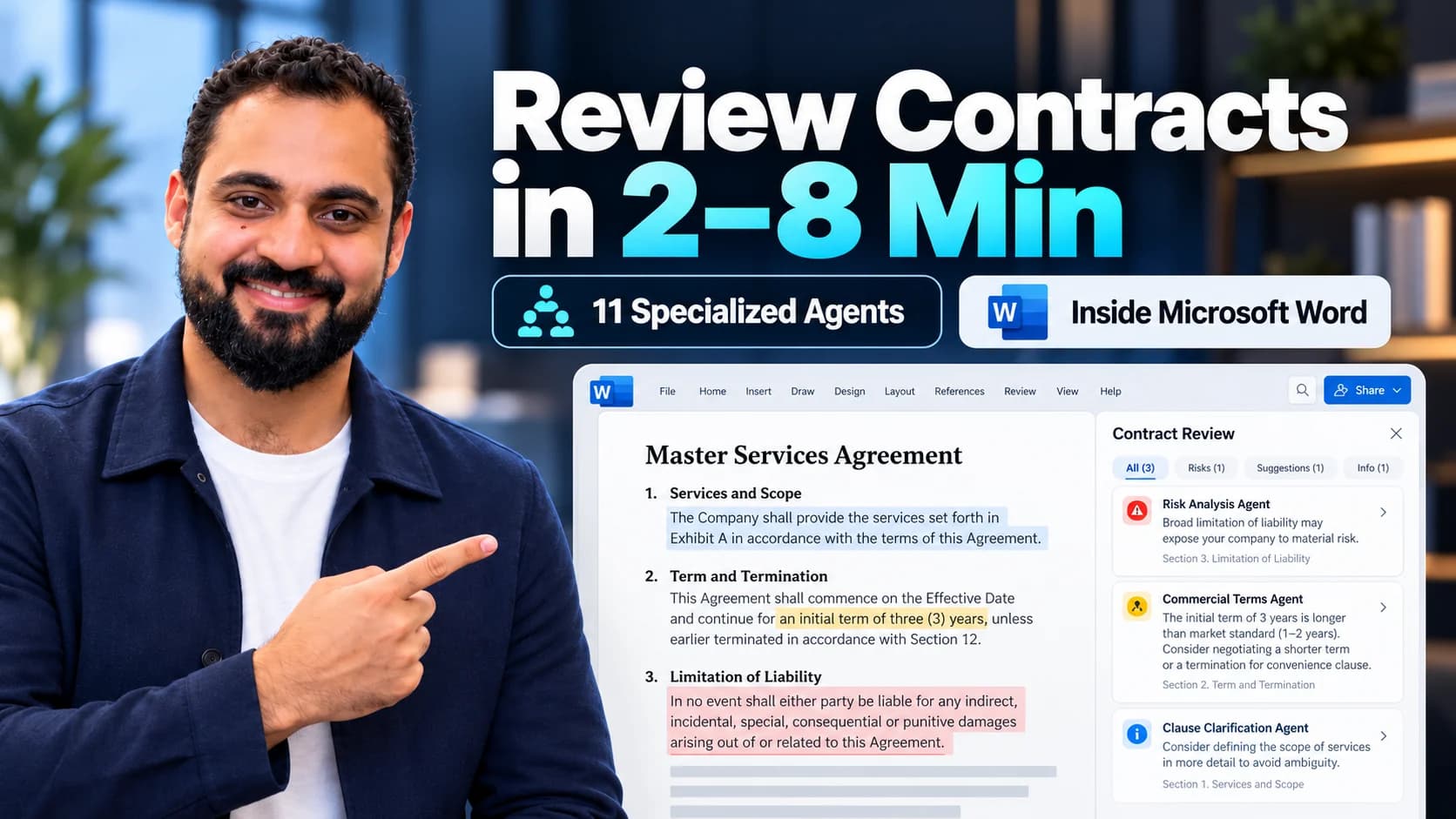
- AI specialists
- 18+
- Per 80-page MSA
- ~30 min
- Full analysis
- 2–8 min
- Works in
- Microsoft Word
- Runs in
- The customer’s cloud
The short version
Paralegent AI is a contract-review accelerator from Cognilium AI. It reviews every contract against the customer’s own playbook with 18+ specialist AI agents, works inside Microsoft Word and deploys in the customer’s own cloud. I led it from idea to production, and I present it in its product video.
- My role
- Product manager (AI Solutions Engineer, Cognilium AI)
- Company
- Cognilium AI
- The product
- AI contract review in Word
- Status
- In production · paying clients under NDA
01 / The problem
Contract review is the bottleneck.
An 80-page master agreement takes a lawyer 20 to 30 hours to review by hand. Every reviewer applies the standards a little differently, deals wait in the queue, and legal becomes the bottleneck. A useful AI has to work to the company’s own standards — and leave the decision with the reviewer.
The standard is specific.
The same clause can be fine for one business and a deal-breaker for another. The customer’s playbook is the reference, not a generic model’s opinion.
A flag needs a reason.
A colour alone does not explain a contract. Each finding needs the playbook rule, the reason and the replacement language.
The reviewer owns the call.
Findings belong in the document the lawyer is already reading, ready to accept, change or reject. The AI supports the judgment; it does not replace it.
02 / How it works
From playbook to redlined contract, in three steps.
Upload the playbook once. Every contract is then matched clause by clause, analysed by the specialists in parallel and returned as findings in Word.

03 / Inside Microsoft Word
The tool lawyers actually use.
Enterprise lawyers live in Microsoft Word. Any tool that pulls them into a separate interface hits an adoption wall — so Paralegent goes where they already are. A lawyer opens the contract, opens the Paralegent panel and reads the findings in the document they were going to read anyway.
Illustration · fictional agreement and playbook
EXAMPLE CORPORATION
MASTER SERVICES AGREEMENT
GENERAL TERMS AND CONDITIONS
Fictional agreement · for illustration only
9. Limitation of Liability
Vendor's total aggregate liability arising out of or related to this Agreement shall not exceed the lesser of (i) USD 50,000 or (ii) the fees paid by Customer to Vendor in the prior three (3) months. The foregoing limitation shall apply notwithstanding any failure of essential purpose of any limited remedy.
12. Term and Termination
This Agreement shall commence on the Effective Date and shall continue for an initial term of one (1) year. Thereafter, this Agreement shall automatically renew for successive one-year terms unless either Party provides thirty (30) days' written notice of non-renewal prior to the then-current expiration date.
14. Governing Law and Jurisdiction
This Agreement shall be governed by and construed in accordance with the laws of the State of New York, without regard to its conflict of laws principles.
15. Indemnification
Each Party shall indemnify, defend, and hold harmless the other Party from and against any and all third-party claims, losses, damages, liabilities, costs, and expenses arising out of a breach of its representations, warranties, or material obligations.
Office.js add-in · Word on Windows, Mac and the web, with the same features on each.
Three moves, all inside Word
- 01
Pick a playbook. Click Review Contract.
The sidebar has two tabs, Contract Review and Playbooks. A vendor MSA and a statement of work can each use their own playbook — one click to switch. Clauses are matched in 15–20 seconds.
- 02
Findings stream in, live.
No waiting for one big report. Payment and warranty findings arrive while IP and termination are still running, and the progress bar shows which categories are done.
- 03
Accept, modify or reject.
Each finding is a native Word comment on the exact clause. Accept inserts the replacement language, Modify lets you adjust it, Reject dismisses it — the track-changes habit lawyers already have.
One finding, as the reviewer sees it
What every finding carries
- 01
Risk level
GREEN approve · ORANGE escalate for sign-off · RED negotiate before signing.
- 02
Playbook rule
The exact term of the customer’s playbook the clause departs from.
- 03
Plain reason
Why the clause is a risk, in one or two sentences a deal team can read.
- 04
Replacement language
The customer’s preferred or fallback wording, ready to insert in one click.
- 05
Confidence
How sure the analysis is. The orchestrator surfaces only high-confidence findings.
- 06
A complete .docx
Findings are standard Word comments, so colleagues see them without the add-in.
Why Word, not a web app
Reviewing inside Word vs the alternatives.
| Capability | Paralegent in Word | Copy-paste into a chatbot | A separate web tool |
|---|---|---|---|
| Where you work | Inside Microsoft Word | A browser chat window | Another web app |
| Findings | Native Word comments | Unstructured chat text | A proprietary viewer |
| On the exact clause | Yes | No — a summary | Only after export |
| Accept / modify / reject | One click per finding | Manual copy-paste | Export, then edit |
| Results arrive | As each specialist finishes | After the full response | Varies |
| Standard applied | The customer’s own playbook | A generic prompt | Limited templates |
| What you share | A standard .docx | A chat transcript | A PDF export |
| Where the data goes | Stays in the customer’s cloud | A vendor’s servers | Varies |
Try it: same clause, different playbook
Why the playbook matters.
Switch between three example playbook positions to see how the same clause is classified. A fictional illustration, not a product result or legal advice.
Payment terms
The invoice is payable within 60 days of receipt.
Playbook comparison
Escalate for sign-off
- Example playbook
- This example playbook prefers 30 days and allows up to 60 days with approval.
- Why it is flagged
- The term differs from the preferred position, but an approved exception can cover it.
- Possible next step
- Escalate to the person who approves exceptions, or offer the preferred 30 days.
A person reviews the finding and decides how to proceed.
The value is the explanation between the flag and the decision.
04 / Who it’s for
One review system. Different jobs.
The same playbook, specialists and Word panel do a different job for each team that touches contracts.
General counsel & in-house legal
Routine clauses are scored before they reach the desk; only exceptions and judgment calls land in the queue.
Every redline carries its rationale, playbook rule and confidence — a review the team can defend.
Procurement
Every inbound supplier agreement is checked against the standard terms and its deviations flagged by clause and risk level.
Procurement reviews the exceptions, not every clause — without routing routine MSAs to outside counsel.
Legal operations
One playbook applied the same way on every contract, by every reviewer.
Consistency that no longer depends on who picked up the contract.
IT & security
Approving AI that touches the company’s most sensitive documents.
It runs in the company’s own cloud on the LLM they choose; contract data never leaves.
05 / How it’s built
Specialists, an orchestrator and the customer’s own cloud.
Not one generic model. A playbook engine, semantic contract matching and 18+ domain specialists coordinated by an orchestrator — deployed where the customer’s contracts already live.
- 01
Playbook engine
80–150 terms extracted once: preferred positions, fallback language, risk thresholds.
- 02
Contract matching
Each clause embedded as a 1,536-dimensional vector and matched to the playbook in 15–20 seconds.
- 03
Orchestrator
Routes each clause to the right specialist, resolves conflicts and keeps only high-confidence findings.
- 04
Findings in Word
GREEN / ORANGE / RED with rule, reason, replacement language and confidence — in 2–8 minutes.
18+ specialists, one per playbook category
- Warranty
- Liability
- Indemnity
- IP
- Termination
- Payment
- Confidentiality
- Data
- Compliance
- Governing law
- and more
Runs in the customer’s cloud
- Azure
- AWS
- Google Cloud

On the customer’s LLM
- Azure OpenAI
- AWS Bedrock
- Vertex AI

Inside Microsoft 365
- Word
- Outlook
- SharePoint
- Teams
- OneDrive



Contract data never leaves the customer’s environment. Not a subscription: a one-time implementation in 8–10 weeks, and the customer owns the system.
- LangGraph
- Google ADK
- Office.js add-in
- 1,536-d semantic search
06 / The calls I made
The product decisions that shaped it.
Leading the product meant choosing what Paralegent would not be. Each of these traded something easy for something a legal team could trust.
Their playbook, not a generic opinion.
Review every contract against the customer’s own positions and fallback language.
The trade-offOnboarding takes real work — 80–150 terms extracted once — but every finding is one the legal team can defend.
Meet lawyers in Word.
Ship as a Word add-in instead of another web app to log into.
The trade-offWorking inside Office.js limits the interface, but there is nothing new to adopt, findings sit on the exact clause and the reviewed .docx stays a complete deliverable.
Their cloud, not ours.
Deploy inside the customer’s Azure, AWS or Google Cloud, on the LLM they choose.
The trade-offEach customer needs an 8–10 week implementation instead of a sign-up page, but contract data never leaves their environment.
Specialists, not one model.
Split review across 18+ domain specialists with an orchestrator that resolves conflicts.
The trade-offMore moving parts to coordinate, in exchange for clause-level depth and a confidence score on every finding.
07 / Results
Hours of review, down to minutes.
What the product does on a real master agreement — the figures Paralegent publishes as verified.
- Per 80-page MSA
- 30 h → 30 minManual review vs Paralegent
- Full analysis
- 2–8 minPer contract, all specialists in parallel
- Findings per MSA
- 40–50Each with rule, reason and replacement
- Review cycle
- 15 → 2 daysAttorney review before signing an MSA
In production and in go-to-market with paying clients, under NDA — so no client names, logos or revenue here.
Figures as published in Paralegent’s verified product statistics and confirmed with its founder (2026). The 20–30 hour baseline is the manual-review estimate for an 80-page master agreement.
In my words
The product video I present.
I present Paralegent AI in its product video: the playbook, the specialist agents and the results inside Word.
Read the transcript
Welcome, and I’m glad you’re here to learn more about our company. At Paralegent AI, we believe legal teams shouldn’t spend their days buried in contracts. Your lawyers went to law school to practice law.
Our vision was never to build another generic AI tool. We set out to build something that actually understands your legal standards and applies them consistently every single time.
Today lawyers spend up to 60% of their time just reviewing documents. Every reviewer applies different standards. Legal becomes the bottleneck. That was the old way.
Introducing Paralegent AI. 11 specialized AI agents, not one generic model, review every contract against your company’s own legal playbook. And it works right inside Microsoft Word. No new tools, no switching apps, zero workflow disruption.
Upload your legal playbook once. Paralegent AI learns your preferred positions, your fallback language, your standards. Then it applies them consistently to every single contract.
Instead of one AI trying to do everything, 11 domain-specific specialists each focus on what they know best: warranty, IP, termination, compliance, and more. Every clause gets expert-level attention. Not one perspective.
Every flagged clause is classified into three clear action levels. Red means negotiate before signing. Amber means escalate for review. Green means you’re good to go. No ambiguity, just clear, actionable guidance, given with your preferred fallback language included.
A full contract review that used to take hours now takes 2 to 8 minutes. 12 legal categories analyzed in parallel. Real-time results appearing as highlights directly in your document. You watch it happen right there in Word.
Paralegent AI isn’t just another AI tool. It’s a new standard for how contracts get reviewed. Your playbook, your rules, applied with the rigor of 11 specialists. We’re excited about what Paralegent AI can do for legal teams everywhere, and we can’t wait for you to see it in action.
From the video’s captions, lightly corrected: the product name, music markers and a few misheard words. Recorded for the March 2026 launch, when the product ran 11 specialists.
08 / What I bring to your product
AI that fits the way a business already works.
Paralegent is the pattern I bring to an AI product: start from the expert’s own standards, put the AI inside the tool people already use, and deploy it where the data must stay.
Agentic systems with a job
Specialist agents and an orchestrator designed around one workflow, not a demo.
Enterprise deployment by design
Customer-cloud, LLM-agnostic delivery that passes a security review.
Human judgment in the loop
Explainable findings with confidence, so experts decide faster — not blindly.
Questions
The product. My role. The boundaries.
What did Ali Ahmed do on Paralegent AI?
As AI Solutions Engineer at Cognilium AI, I led Paralegent AI as its product manager, from idea to production: the product direction and the calls behind it — the customer’s own playbook as the standard, Microsoft Word as the place it works, and deployment in the customer’s own cloud. I also present it in its product video. The multi-agent engineering was a team effort.
What is Paralegent AI?
An AI contract-review accelerator from Cognilium AI. A legal team uploads its playbook once; 18+ specialist AI agents then review every contract against it and return GREEN, ORANGE or RED findings — each with the playbook rule, a reason, replacement language and a confidence score — inside Microsoft Word.
How fast is a review?
Clauses are matched to the playbook in 15–20 seconds and the full analysis takes 2–8 minutes. Paralegent puts an 80-page master agreement at about 30 minutes of review, against 20–30 hours by hand, with 40–50 findings.
Is Paralegent a SaaS product?
No. It deploys inside the customer’s own Azure, AWS or Google Cloud environment, on the LLM they choose (Azure OpenAI, AWS Bedrock or Google Vertex AI), so contract data never leaves. It is a one-time implementation of 8–10 weeks, and the customer owns the system.
How is Paralegent AI different from Harvey or Legora?
Harvey and Legora offer broad AI workspaces for legal teams: research, document review, drafting and multi-step agent work. Paralegent AI does one job. It reviews contracts against the customer’s own playbook, inside Microsoft Word, and it is deployed in the customer’s own Azure, AWS or Google Cloud on the LLM they choose, as a one-time 8–10 week implementation the customer owns. It is not a ranking: they fit different buyers.
Who presents the Paralegent AI product video?
I do. I present Paralegent AI’s product video, published on the Paralegent AI YouTube channel on 19 March 2026. It was recorded for the launch, when the product ran 11 specialists; it runs 18+ today. The transcript is on this page.
Did Ali found Paralegent AI or Cognilium AI?
No. Mudassir Marwat is Founder & CEO. My title is AI Solutions Engineer, and on Paralegent AI I was the product manager: I led the product, not the company.
Is the Word example on this page a real contract?
No. The Word walkthrough and the playbook example are illustrations with fictional agreements and positions. They show how the product works, not a customer contract, a benchmark or legal advice.
How can I work with Ali on a similar product?
Contact me at hello@alioahmed.com about AI product leadership, agentic systems for document-heavy work or roles that join product judgment with hands-on delivery. Paralegent demos are company enquiries, separate from hiring me.
Ali AhmedAI Solutions EngineerWork with Ali Ahmed
Building an AI product for experts?
Talk to me about AI product leadership, agentic systems for document-heavy work, or a role that joins product judgment with hands-on delivery.